Build Custom AI Phone Agents in 53 Seconds

Create AI phone agents tailored to your business, with the instructions, knowledge, and actions needed to handle real customer calls.
The AI phone system trusted by 500+ modern businesses

  • dialbird customer logo of tunic pay
  • dialbird customer logo of posthog
  • dialbird customer logo of StackOne
  • dialbird customer logo of Worldwide clinical trials
  • dialbird customer logo of Kope
  • dialbird customer logo of tunic pay
  • dialbird customer logo of posthog
  • dialbird customer logo of StackOne
  • dialbird customer logo of Worldwide clinical trials
  • dialbird customer logo of Kope
  • dialbird customer logo of tunic pay
  • dialbird customer logo of posthog
  • dialbird customer logo of StackOne
  • dialbird customer logo of Worldwide clinical trials
  • dialbird customer logo of Kope

Build, launch, and improve without slowing down

Build, launch, and improve
without slowing down

Ready in seconds

Go from a new agent to a working setup in as little as 53 seconds.

No technical setup

Build and manage your agent without code or specialist knowledge.

Easy to update

Change how your agent works whenever your business needs evolve.

Test before going live

Review your setup and make adjustments before handling real calls.

Built to scale

Create additional agents as new teams, roles, or use cases appear.

Manage everything in one place

Keep your AI agents and phone system together inside Dialbird.

Dialbird keeps AI agent setup simple, so your team can move from an idea to a working phone agent without a long implementation process.

Build, launch, and improve without slowing down

Ready in seconds

Go from a new agent to a working setup in as little as 53 seconds.

No technical setup

Build and manage your agent without code or specialist knowledge.

Easy to update

Change how your agent works whenever your business needs evolve.

Test before going live

Review your setup and make adjustments before handling real calls.

Built to scale

Create additional agents as new teams, roles, or use cases appear.

Manage everything in one place

Keep your AI agents and phone system together inside Dialbird.

Crystal-clear quality, rock-solid
connectivity, and no dropped calls.

Everything you need to
build an AI agent your way

Everything you need to
build an AI agent your way

Choose a role

Choose a role

Define what your AI agent handles, from customer enquiries to lead qualification and bookings.

Dialbird AI Agent Builder creating a custom agent role with a name, identity, and responsibilities for handling customer calls
Set the personality

Set the personality

Choose how your AI agent sounds, from friendly and professional to concise or conversational.

Dialbird AI Agent Builder selecting the AI agent voice and personality for customer conversations.
Write instructions

Write instructions

Give your AI agent clear guidance on how to respond, ask questions, and handle different calls.

Dialbird AI Agent Builder adding clear instructions that guide how the AI should respond and handle different calls.
Choose what tasks to perform

Choose what tasks to perform

Choose the actions your AI agent can take, from collecting details to booking appointments.

Collect caller information

Qualify leads and enquiries

Book appointments automatically

Dialbird AI Agent Builder assigning tasks such as sending quotes, updating CRM records, and creating follow-ups during calls.
Configure transfers

Configure transfers

Set when your AI agent should transfer a call and choose exactly where the caller should go.

Dialbird AI Agent Builder configuring call transfers to the right team member when human support is needed.
Add company knowledge

Add company knowledge

Add business knowledge so your AI agent can answer customer questions accurately.

Dialbird AI Agent Builder adding company knowledge so the AI can answer customer questions using accurate business information.
Bring into your call flow

Bring into your call flow

Place your AI agent into a call flow and control which calls it handles and what happens next.

Dialbird AI Agent Builder adding the AI agent into a call flow and routing incoming calls based on business hours and availability.

A better way to handle every call

Before Dialbird

Every call depends on someone being available to answer

Teams repeat the same answers again all throughout the day

Busy periods make it easier to miss valuable incoming leads

Caller details are collected manually during every call

Booking requests create extra admin work for the whole team

Calls outside business hours often remain fully unanswered

After Dialbird

Calls can be answered automatically whenever they arrive

Common questions receive clear and consistent responses

Lead details can be captured even during the busiest hours

Caller information is collected during every conversation

Book appointments with less manual admin work

Calls can be covered even beyond your normal working hours

Dialbird AI handling incoming calls for a hybrid team, answering common questions, capturing caller details, and routing calls through a custom call flow.

Give every caller a better first response

Let Dialbird AI answer common questions, capture key details, and direct each call to the right teammate, so your team can stay responsive from anywhere.

1

Define your AI agent

Set its role, tone, and how it should handle initial calls.

2

Add your business context

Add business information, FAQs, and the details it needs to respond clearly.

3

Add AI to your call flow

Choose when it should answer, route calls, or hand them to your team.

4

Go live on your number

Let AI support incoming calls while your team stays focused on customers and higher-value work.

An AI colleague that works with your team
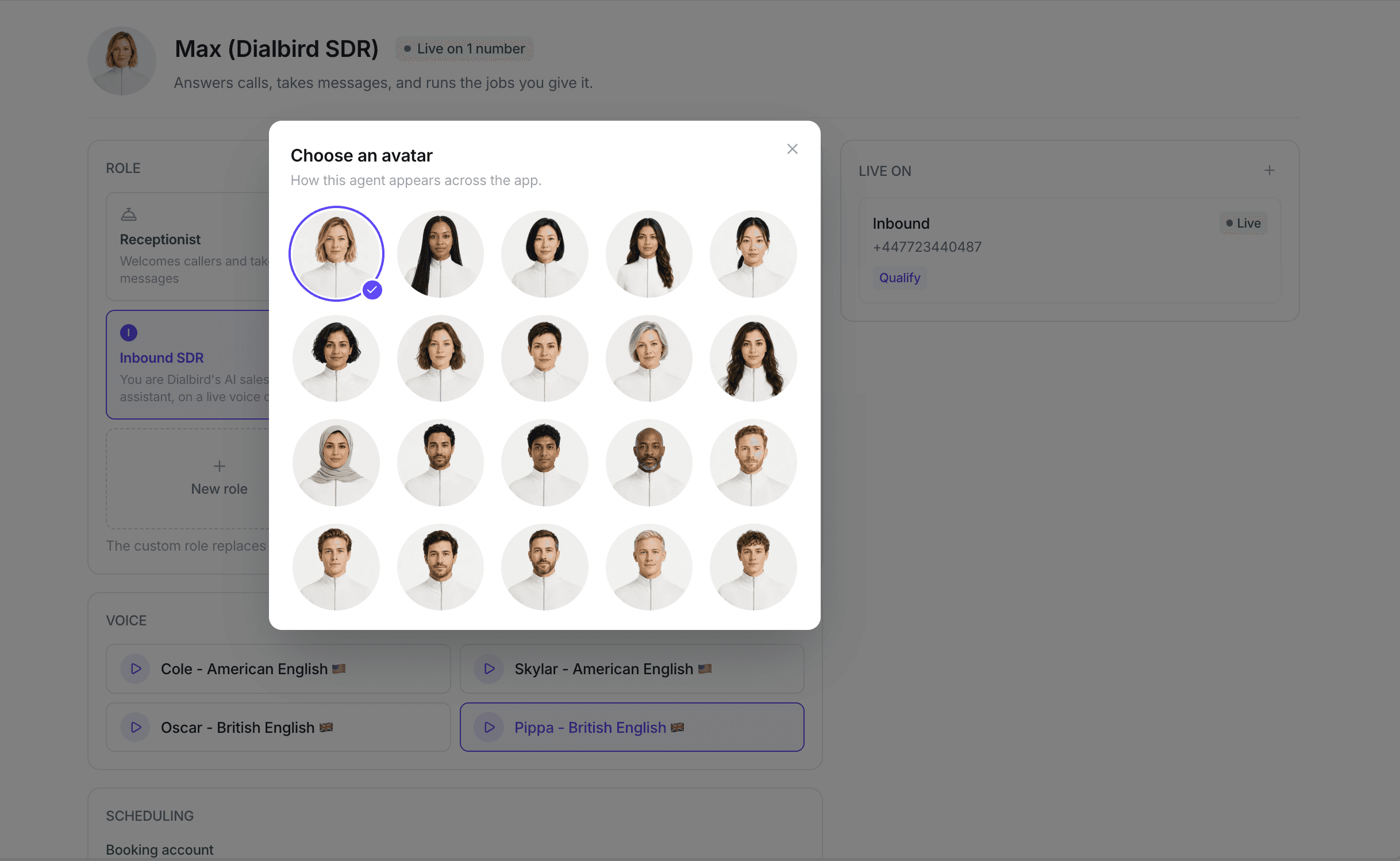
Dialbird AI agent setup showing avatar selection, custom roles, voice options, scheduling, and a live business number for handling customer calls.

AI Agent

Let AI handle routine calls while your team focuses on what needs a human touch all within Dialbird.

Dialbird AI agent setup showing avatar selection, custom roles, voice options, scheduling, and a live business number for handling customer calls.

AI Agent

Let AI handle routine calls while your team focuses on what needs a human touch all within Dialbird.

Always available

Handle calls when your team is busy, unavailable, or outside business hours.

Built around your business

Configure roles, greetings, knowledge, and workflows around the way your team already works.

Ready for real callers

Give customers consistent answers and a clear next step on every call.

Pick a number. Set up Dialbird AI.
Start growing. Dialbird is that simple.

Pick a number. Set up Dialbird AI. Start growing. Dialbird is that simple.

Pick a number. Set up Dialbird AI.
Start growing. It's is that simple.

Local, mobile, and toll-free numbers. Live in minutes, no setup required.

Local, mobile, and toll-free numbers. Live in minutes, no setup required.

Local, mobile, and toll-free numbers. Live in minutes, no setup required.

Frequently asked questions

How quickly can I create an AI phone agent?

Dialbird is designed to make setup fast. A basic AI agent can be created and configured in as little as 53 seconds.

Do I need to know how to code?

No. You can configure your agent's role, personality, instructions, knowledge, actions, and call handling directly from the Dialbird interface.

Can I create different AI agents for different jobs?

Yes. You can build agents around different responsibilities and configure each one with its own instructions and knowledge.

Can the AI agent transfer calls to my team?

Yes. You can define when a caller should be transferred and where the call should go.

Can I control which calls the AI agent handles?

Yes. Your agent can be added directly into a Dialbird call flow, giving you control over when and how it answers calls.

What information can I give my AI agent?

You can add business information that helps the agent understand your company and answer customer questions more accurately.

Can I update my agent after it is live?

Yes. You can adjust its instructions, knowledge, behavior, and call handling as your needs change.

Dialbird company logo

The next-gen business phone system

© 2026 Dialbird, a product of Ramo Technologies LLC. All rights reserved.

Dialbird LinkedIn page
Dialbird Facebook page
Dialbird Reddit community
Dialbird X (twitter) account

Dialbird

Product

Solutions

Resources

Download

Company

Dialbird company logo